
A traditional apparel photoshoot can become complicated long before the camera is switched on. You need to find a model, book a photographer, arrange a location, prepare samples, coordinate styling, plan poses, manage retouching, and repeat much of the process whenever a new product, color, season, or campaign arrives. For a growing clothing brand, producing enough visual content for product pages, paid ads, social media, marketplaces, and seasonal launches can quickly become expensive and difficult to scale.
AI on-model photography offers a different approach. Instead of organizing a new photoshoot for every garment, brands can transform existing flat-lay, hanger, mannequin, or catalog images into on-model apparel visuals. However, creating a convincing image involves much more than placing a shirt on an attractive AI-generated person.
The model may look realistic while the garment is completely wrong. A neckline can change shape. A logo can become unreadable. Buttons can move. Sleeves can become shorter. Fabric can appear heavier, thinner, shinier, or more transparent than the actual product. For an e-commerce brand, those are not minor visual imperfections. They can change what customers believe they are purchasing.
The real goal, therefore, is not simply to generate realistic AI fashion models. It is to create product-accurate, commercially useful, and responsible apparel imagery that helps customers understand the garment without misleading them.
This guide explains how to create on-model clothing photos without hiring models, how to make the results feel natural, how to protect garment fidelity, and when AI should not replace a real photoshoot.
What Is AI On-Model Photography?
AI on-model photography is the process of creating images that show a real clothing product worn by a synthetic or AI-generated model.
The process usually begins with an existing product image. That source could be a clean flat lay, a hanger photograph, a ghost mannequin image, a simple catalog photo, or several reference images showing the garment from different angles.
An AI clothing model generator then uses those references to create a new visual in which the garment appears on a person. Depending on the creative direction, the final image might look like a clean studio photograph, a street-style campaign, an editorial fashion shoot, a travel scene, or a natural lifestyle image for an e-commerce product page.
This makes AI apparel photography particularly valuable for brands that need to produce:
On-model product listing images
Lifestyle photos for clothing collections
Social media content
Paid advertising creatives
Seasonal campaign visuals
Fashion lookbook images
Marketplace-ready apparel content
Multiple visual variations from one product
The purpose is not necessarily to eliminate every traditional photoshoot. It is to make visual production more flexible, especially when a brand needs more content than a conventional production schedule can realistically provide.
AI On-Model Photography, Virtual Try-On, and Ghost Mannequin Photography Are Not the Same
These terms are often grouped together, but they solve different problems.
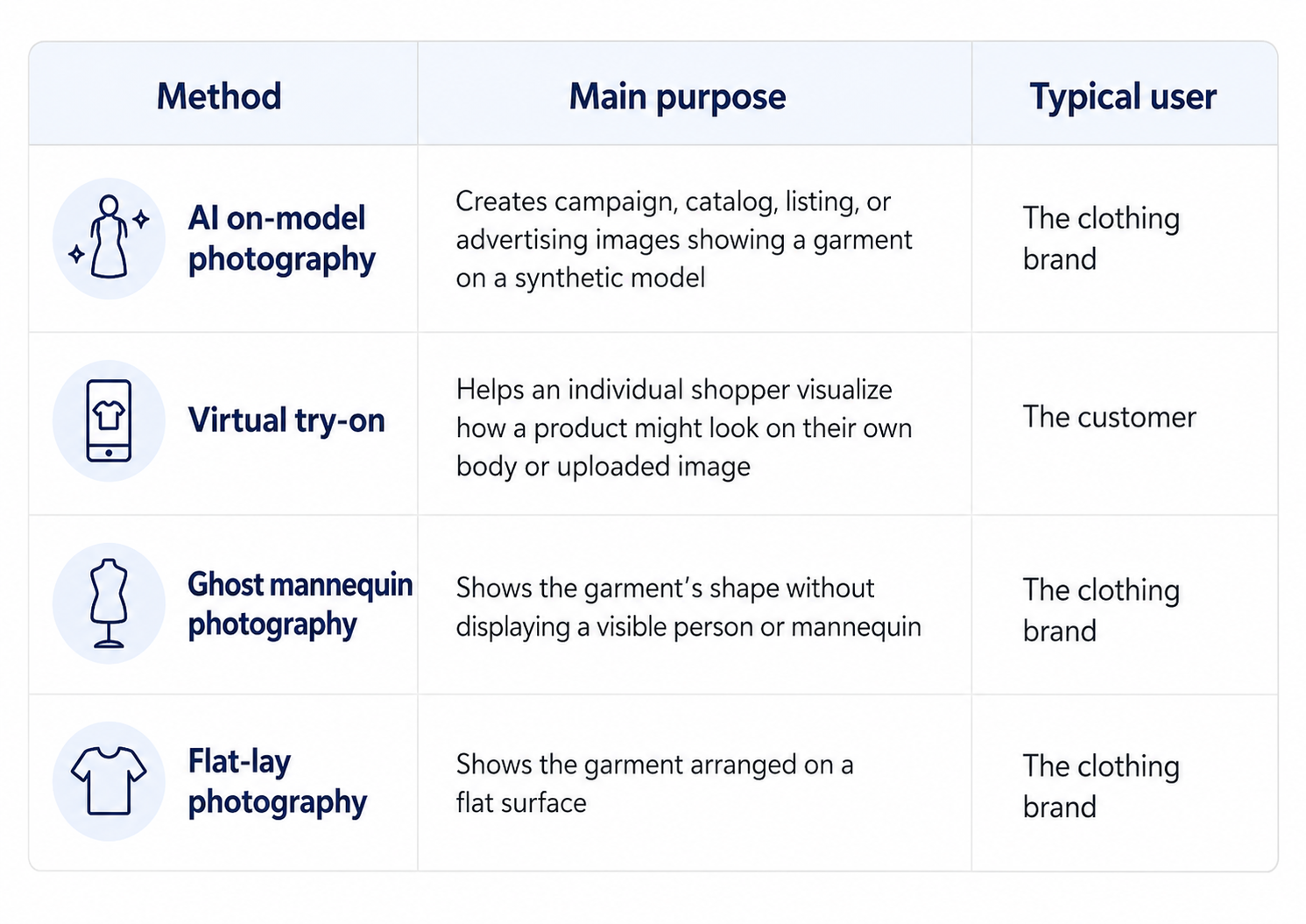
AI on-model photography is a content-production workflow, while virtual try-on is usually a personalized shopping experience. That distinction matters because an AI-generated on-model image should not automatically be presented as proof of exact fit. It can show a plausible visual interpretation of a garment, but it does not confirm how the product will fit every customer or body shape.
Ghost mannequin and flat-lay images are also not outdated formats that need to be replaced. In many cases, they are the most useful source materials for generating accurate on-model visuals.
Start With the Right Product Image
The quality of an AI fashion image depends heavily on the information available in the original garment photo. A weak input forces the AI to guess. When important details are hidden, blurry, folded, cropped, or poorly lit, the system may invent them. The result can look visually polished while no longer representing the real product.
Flat-lay images
A flat lay can work well when the garment is fully visible and arranged naturally. The sleeves should not overlap the body of the garment, the neckline should be clearly defined, and excessive folds should be avoided.
Flat lays are especially useful for T-shirts, sweatshirts, shirts, simple dresses, skirts, and other garments whose overall construction can be understood from the front. Their limitation is that they do not show how the fabric behaves around a real body. The AI must estimate the garment’s drape, volume, tension, and folds.
Hanger photos
A hanger image can be a practical starting point for brands that already have basic inventory photography. It often communicates the garment’s length and silhouette more clearly than a crowded flat lay.
However, hanger photos can introduce unnatural shoulder shapes. The hanger may stretch the neckline, create sharp corners, or change how the fabric falls. Those distortions should not be carried into the final on-model image.
Ghost mannequin images
Ghost mannequin photography often provides a strong balance between product clarity and three-dimensional form. It can show the neckline, torso volume, sleeve structure, and overall shape without the distraction of a visible person.
It is particularly useful for jackets, tailored clothing, structured dresses, button-down shirts, and garments with a defined shape. The main risk is that invisible sections of the garment may already have been reconstructed during editing. Those areas should be reviewed carefully before using the image as an AI reference.
Existing model or catalog images
An existing on-model photograph can provide helpful information about garment fit, fabric drape, sleeve length, and proportions. It can be used to generate different poses, environments, or campaign variations.
However, brands should be careful when using images of real people. A person’s face, body, pose, or distinctive appearance should not be replicated in a new synthetic campaign without appropriate permission.
Front, back, and detail references
One image may be enough for a simple garment, but more complex products benefit from additional references. A strong apparel reference set can include:
A clean front image
A back image
Close-ups of logos or embroidery
Fabric texture details
Buttons, zippers, pockets, or trims
A color reference photographed in neutral light
An existing fit reference, when available and properly licensed
These images reduce the amount of information the AI must invent.
How to Create On-Model Apparel Photos With AI
The best results usually come from treating AI on-model photography as an iterative creative process rather than a one-click conversion.
1. Prepare the garment image
Begin with the clearest product image available. Remove distracting objects, correct obvious lighting problems, and make sure the entire garment is visible.
Do not over-edit the source. Heavy sharpening, aggressive color correction, artificial smoothing, and excessive contrast can hide real fabric information. The goal is to provide an accurate reference, not a stylized interpretation.
2. Define the model based on the customer, not a trend
Choose a model whose general appearance supports the intended audience and campaign. Consider age range, body type, pose, styling, and overall energy.
Avoid choosing a model simply because the person looks conventionally “perfect.” A visually impressive model who feels disconnected from the product or customer can make the entire image feel artificial.
Model diversity should also be handled thoughtfully. Representation should feel like part of the brand’s genuine visual language, not a superficial variation added only to make a campaign appear inclusive.
3. Choose a pose that reveals the garment
A fashion pose should support the product rather than hide it. Hands placed over a logo, folded arms covering the neckline, handbags blocking the silhouette, or extreme body angles may create an attractive editorial photograph while making the garment difficult to evaluate.
For product pages, begin with clear and natural poses. More expressive poses can be introduced for ads, social media, and campaign imagery after a reliable product-focused version has been created.
4. Match the scene to the garment
The environment should make sense for the product. A lightweight summer dress may fit naturally into a bright outdoor café or coastal setting. A technical jacket may need an urban or outdoor environment. A premium blazer might work better in a restrained studio, hotel, office, or architectural scene.
The background should add context without competing with the garment.
5. Establish one believable lighting direction
Lighting is one of the fastest ways to reveal a fake-looking AI image. The face may be lit from the left while the garment is lit from the front. The model may cast a shadow in one direction while nearby furniture casts shadows in another. The background may suggest bright daylight while the clothing appears to have been photographed under soft studio lighting.
A realistic image needs one coherent visual world. Light direction, shadow softness, reflections, contrast, and color temperature should agree across the model, garment, and environment.
6. Generate, inspect, and refine
The first result should be treated as a draft. Inspect it closely, identify the exact areas that need correction, and refine those areas instead of repeatedly generating unrelated versions. This preserves more of what already works.
In Adject, this process takes place inside a continuous canvas-based workspace. Garment references, models, generated scenes, variations, and edits can remain connected within a project rather than being exported into separate tools after every generation.
The AI agent can work within that context to modify existing visuals, produce variations, and continue developing a campaign without forcing the user to restart from an empty prompt each time.
7. Create channel-specific versions
A strong product image should not simply be stretched or awkwardly cropped for every platform. After the core visual is approved, create intentional variations for product pages, marketplace listings, Instagram, Pinterest, paid social, display advertising, and short-form video.
The garment should remain consistent while the composition changes to fit the channel.
How to Make AI Fashion Images Look Real
Most fake-looking AI fashion images fail because several small inconsistencies appear at the same time. The face may be overly smooth. The hands may look slightly unnatural. The garment may sit strangely around the waist. The background may have unrealistic depth. Fabric folds may not respond to the pose. Shadows may feel painted onto the scene.
Each problem may appear minor, but together they make the image feel synthetic.
Use natural skin texture
Real skin is not perfectly smooth. It contains pores, fine lines, subtle tonal changes, and small asymmetries.
Overly polished skin often creates the waxy appearance associated with AI-generated portraits. The goal should not be to add visible imperfections for effect, but to avoid removing every sign of natural texture.
Avoid exaggerated fashion poses
Extreme poses make anatomy and fabric interaction more difficult to generate accurately. A model leaning dramatically, twisting at the waist, crossing limbs, or placing both hands around the garment may introduce distorted fingers, impossible joints, stretched seams, and unnatural fabric tension.
Simple poses are not necessarily boring. Small shifts in posture, eye direction, stance, and hand placement can create variety while keeping the image believable.
Give the garment physical weight
Fabric should respond to gravity, body movement, and material properties. Denim should not drape like silk. A heavy wool coat should not cling like activewear. A loose cotton shirt should not appear vacuum-sealed to the body.
Realistic garment drape depends on the relationship between the material, cut, body posture, and movement. When those elements disagree, the clothing feels pasted onto the model.
Keep depth of field plausible
An excessively blurred background is often used to hide generation problems, but it can make an image feel more artificial. The amount of blur should make sense for the apparent camera distance, lens, framing, and subject position.
A full-body street photograph should not necessarily have the same shallow depth of field as a close portrait.
Preserve small asymmetries
Perfect symmetry is rarely realistic. Fabric folds, hair, posture, facial features, and garment tension usually differ slightly from one side to the other.
Images often feel more natural when they include controlled asymmetry rather than mathematically perfect balance.
Protecting Garment Accuracy
A beautiful AI fashion model is not useful if the garment is wrong. Garment fidelity should be reviewed separately from overall image quality. Do not approve a visual simply because it looks like a professional photograph.
Compare the generated image with the original product and check the following details carefully:
Neckline shape and depth
Sleeve length and width
Shoulder construction
Hemline and total garment length
Buttons, zippers, and fasteners
Pocket position and size
Logos, labels, and typography
Print direction and scale
Embroidery placement
Stitching and seams
Fabric texture and shine
Transparency and lining
Color accuracy
Garment proportions
Fit around the waist, chest, hips, and shoulders
Natural folds and fabric drape
Logos and written text deserve particular attention. AI systems may replace letters, change spacing, duplicate design elements, or turn a recognizable mark into meaningless shapes.
Patterns can also drift. A print may change scale between the torso and sleeve, stripes may stop aligning at seams, or repeated motifs may become inconsistent.
These details affect more than visual quality. They affect whether the image represents the product customers will receive.
Fit accuracy requires special care
An AI image can demonstrate a possible styling and visual silhouette, but it should not be treated as an exact fit guarantee. The generated body may not match the measurements used in the brand’s size chart. The AI may tighten, loosen, shorten, or reshape the garment to create a more visually pleasing result.
For that reason, product pages should continue to rely on accurate measurements, size charts, garment dimensions, fabric composition, stretch information, and genuine fit guidance. AI-generated model images can support those details, but they should not replace them.
Creating Lifestyle Scenes Without Making the Product Look Fake
Lifestyle photography works when the scene makes the product easier to imagine in real life. Google’s own Merchant Center guidance describes lifestyle images as a way to show products in real-world contexts and specifically includes clothing worn by a model as an example.
That does not mean the scene should become the main attraction. An elaborate background can easily overpower a simple garment. Dramatic architecture, excessive props, unrealistic sunlight, crowds, vehicles, or visually complex interiors may make the campaign look expensive while reducing product clarity.
A better scene begins with a simple question:
Where would someone genuinely wear this product?
For a casual knitwear brand, that may be a quiet café, a city sidewalk, or a naturally lit apartment. For activewear, it may be a restrained training environment. For resortwear, it may be a poolside or coastal setting. For premium workwear, it may be a modern office or minimal architectural space.
The scene should also match the styling. Footwear, jewelry, bags, hair, and makeup should support the collection without introducing products the brand does not sell in a way that creates confusion.
Most importantly, the garment should remain visible. Lifestyle does not have to mean visually busy.
Building a Consistent Apparel Campaign
Generating one convincing image is relatively easy compared with building a consistent collection. A campaign may need the same model across several garments, multiple angles of the same product, matching light across an entire collection, and a recognizable background or visual mood.
Without a persistent workflow, each new generation can begin to drift. The model’s face changes. Hair length changes. Body proportions shift. The location looks different. The color grade becomes warmer or cooler. The garment is interpreted differently in each image.
This is where a project-based creative system becomes more valuable than a basic prompt-and-download generator. Adject v2.0 keeps creative work inside a canvas, supported by reusable assets and project context. Products, models, brand elements, previous generations, edits, and variations can remain available as part of the same working environment.
Instead of generating an image, downloading it, editing it elsewhere, and rebuilding the setup for the next version, the workflow becomes:
Create, inspect, edit, iterate, reuse, and scale.
That continuity is particularly useful for apparel brands producing seasonal collections, color variations, regional campaigns, product page sets, and social content from the same source assets.
Once the main composition is working, the approved visual can also become the starting point for motion or short-form video rather than requiring a completely separate production process.
Do not imitate a real person without permission
A synthetic model should not be designed to closely reproduce the face, body, or recognizable identity of a real model, celebrity, creator, employee, customer, or private individual unless the brand has the necessary permission and rights.
Even when the result is not a perfect copy, a distinctive likeness can create ethical, contractual, and legal risks. Using an entirely synthetic model is not automatically risk-free either. Brands should still review the commercial terms of the AI platform, understand how uploaded assets are handled, and confirm that generated outputs can be used for the intended campaign.
Adject allows generated outputs to be used commercially, while users remain responsible for legal compliance and avoiding third-party infringement.
Do not create false endorsements
An AI-generated person should not be presented as a real customer, expert, influencer, athlete, or public figure who personally used or recommended the product.
In the United States, the Federal Trade Commission’s general advertising standard is that claims must be truthful, non-deceptive, and supported by evidence. A synthetic model wearing a jacket is not necessarily making an endorsement. Problems arise when the presentation implies a real experience, opinion, identity, or performance claim that does not exist.
Be transparent where disclosure is required or useful
Disclosure rules vary by market, platform, format, and the way synthetic content is used.
Within the European Union, Article 50 transparency obligations under the AI Act become applicable on August 2, 2026. These rules address machine-readable marking and the labeling of certain AI-generated or manipulated content, including specific deepfake and public-interest use cases.
Not every AI-assisted product image will require the same consumer-facing label. However, brands should avoid treating disclosure as an afterthought.
A responsible workflow includes checking:
The laws of the markets where the campaign will run
The advertising platform’s synthetic-content policies
Marketplace image and metadata requirements
Influencer, endorsement, and testimonial rules
The terms of the AI tool used
Whether the image could reasonably mislead customers
When the synthetic nature of the model could materially affect how a customer interprets the content, clear disclosure may be the safer approach.
Do not erase required AI metadata
Google Merchant Center currently requires images created with generative AI to retain metadata indicating that they are AI-generated, including the relevant IPTC DigitalSourceType information with the TrainedAlgorithmicMedia value. Google specifically advises merchants not to remove embedded AI-generation metadata.
This makes export handling important. An image may contain the correct metadata when it is first generated, but that information can be removed during compression, format conversion, editing, or upload through another tool.
Brands using AI product photography for e-commerce should test their full production and publishing pipeline rather than assuming the original metadata will survive every step.
Avoid misleading product representation
A lifestyle image should not make a garment appear to include features it does not have.
Do not use an AI-generated image if it changes the real:
Color
Pattern
Material appearance
Length
Cut
Coverage
Structure
Branding
Included accessories
Number of items sold
Google’s Merchant Center image requirements state that product images must accurately display the product and show the correct variant, including its color, pattern, and material.
Even outside Google Shopping, this is a useful standard: the image should help customers understand the item, not create a more appealing fictional version of it.
Marketplace and Advertising Considerations
Different platforms use product imagery differently, so one image set should not automatically be uploaded everywhere without review. A clean main image is usually designed to communicate exactly what is being sold. Lifestyle and on-model images provide context, styling inspiration, and a sense of scale.
For Google Merchant Center, merchants can provide lifestyle images separately to show products in natural settings. Google also recommends that apparel imagery show clothing worn by people while keeping the product clearly visible.
For Shopify stores, AI-generated on-model images can be used across product pages, collection pages, landing pages, and editorial content, but the merchant remains responsible for accuracy and customer communication.
For social media and paid advertising, brands should check each platform’s current rules on synthetic media, disclosure, political or sensitive advertising, and misleading claims before launching a campaign.
For any marketplace, maintain a clear connection between:
The image
The selected color and size variant
The product title
The product description
The material and fit information
The item the customer will actually receive
A visually strong image cannot compensate for inconsistent product data.
When You Should Still Use a Real Model
AI on-model photography is useful, but it is not appropriate for every product or campaign. A real model shoot may still be the better choice when the product depends on precise physical performance or genuine human experience.
Examples include:
Exact fit comparisons
When customers are comparing how the same size fits different real body measurements, actual model photography provides stronger evidence.
Technical performance apparel
Sportswear, compression garments, protective clothing, and movement-focused products may need real demonstrations of stretch, support, breathability, or performance.
Complex transparent or reflective fabrics
Sheer materials, sequins, lace, mesh, metallic textiles, and highly reflective surfaces can be difficult to reproduce accurately. Small visual errors may change how customers understand coverage or material quality.
Highly detailed construction
Intricate embroidery, unusual tailoring, handcrafted details, layered garments, or complex prints may require a controlled real photoshoot if AI cannot preserve them reliably.
Campaigns built around a specific person
When a real ambassador, designer, athlete, creator, customer, or community member is central to the campaign, replacing that person with a synthetic model removes the authenticity that gives the campaign meaning.
Testimonials and lived experience
A synthetic person should not replace a real individual when the message depends on genuine product use, personal experience, or endorsement.
The best production strategy is often hybrid. A brand can use real photography for fit evidence, technical demonstrations, hero campaigns, and trust-building content while using AI to expand backgrounds, create lifestyle variations, test creative directions, and produce additional campaign assets.
A Final Quality-Control Checklist
Before publishing an AI-generated apparel image, review it at full resolution and compare it directly with the real product.
Ask:
Is the exact garment immediately recognizable?
Are the color, texture, pattern, and material believable?
Are the neckline, sleeves, seams, pockets, buttons, and hem accurate?
Are logos, prints, and text unchanged and readable?
Does the fabric respond naturally to the model’s pose?
Are the hands, face, posture, and body proportions realistic?
Do the lighting direction and shadows agree across the scene?
Is the product clearly visible and not blocked by styling or props?
Does the image show the correct product variant?
Could the visual create an inaccurate expectation about fit?
Does the image contain any unauthorized real-person likeness?
Are required AI metadata and disclosures preserved?
Does the image comply with the destination platform’s current rules?
Would a customer receive the product they reasonably expect from this image?
If the answer to the final question is uncertain, the image is not ready to publish.
Create More Apparel Content Without Rebuilding Every Photoshoot
AI on-model photography gives apparel brands a practical way to create more visual content from the product images they already have. The biggest opportunity is not simply reducing model or studio costs. It is gaining the ability to explore new scenes, create campaign variations, adapt imagery for different channels, and continue improving existing visuals without rebuilding the production process from the beginning.
But speed is only valuable when the product remains trustworthy.
The most effective apparel images combine a believable model, a coherent lifestyle scene, and accurate garment representation. Fabric texture, color, stitching, logos, proportions, and fit cues matter just as much as the model’s face or the background.
Adject is designed around this continuous way of working. Rather than treating every AI image as a separate file, brands can create, edit, iterate, reuse assets, produce variations, and scale campaigns inside a connected canvas and project system.
That makes it possible to move beyond one-off AI generation and build a repeatable creative workflow for real products, real campaigns, and real e-commerce customers.
The model should look convincing. The scene should feel natural. But above all, the garment must remain true to what the customer will receive.
