

Your Amazon main image has only a few seconds to do its job.
Before a shopper reads your title, compares your bullet points, or scrolls through your secondary images, they see the main product image. It appears in Amazon search results, category pages, sponsored placements, recommendation carousels, and the product detail page. In many cases, it is the first reason someone clicks your listing—or keeps scrolling.
But the main image is not simply a marketing asset. It is also a compliance requirement.
Amazon main image requirements are stricter than the rules for most secondary listing images. A main image that contains a promotional badge, an off-white background, an unclear bundle, or an accessory that is not included can lead to image rejection or search suppression. Even when Amazon does not immediately flag the listing, a confusing main image can reduce trust and attract clicks from shoppers who expect something different from what you actually sell.
This guide explains the Amazon main image rules sellers need to understand before uploading an image. It covers the white background requirement, image dimensions, the 85% product-fill rule, prohibited elements, packaging, props, variations, common rejection reasons, and the difference between main and secondary images.
More importantly, it helps you judge an image the way both Amazon and a shopper might judge it: not only by asking whether it looks attractive, but whether it is clear, accurate, technically suitable, and compliant.
What Amazon Actually Expects From a Main Image
The purpose of an Amazon main image is straightforward: it should show the customer exactly what is being sold without unnecessary visual distractions.
Amazon’s official product image guidance requires main images to use a pure white background, show the product occupying approximately 85% of the image, and avoid added text, logos, borders, color blocks, watermarks, or other graphics. The image must also accurately represent the product and meet any additional rules that apply to its category.
Those rules sound simple until you apply them to a real listing.
Imagine that you sell a stainless-steel water bottle. A compliant main image would normally show the bottle clearly on a pure white background, at a scale large enough to make its shape and finish visible. The image would not include a “Keeps Drinks Cold for 24 Hours” callout, a discount sticker, a gym towel, or fruit placed beside the bottle unless those items are part of the purchase and allowed under the applicable category rules.
The same distinction applies to almost every category. Amazon does not want the first image to function like a social media advertisement. It wants the image to identify the product quickly and reduce uncertainty about what the customer will receive.
This is why the best main image is not always the most decorative image in the listing. Lifestyle scenes, dimensions, feature callouts, comparison graphics, and emotional storytelling can be valuable, but they usually belong in secondary image slots. The main image has a more focused job: clarity first.
There is also an important difference between a rule and a best practice.
A pure white background is a compliance requirement for most standard main images. Making sure the product is still easy to recognize in a small mobile thumbnail is a performance best practice. Using a larger image to support zoom is a technical best practice. Choosing the most visually informative product angle is a conversion decision.
Strong Amazon product photography handles all three layers at once:
It complies with Amazon’s image policy.
It displays correctly across devices and placements.
It helps the right customer understand the offer and click.
A technically compliant image can still underperform if the product looks too small or the chosen angle hides its most recognizable feature. In the same way, an eye-catching image can still put the listing at risk if it uses text, badges, or misleading props.
The White Background, 85% Rule, and Technical Image Requirements
The pure white background rule is probably the best-known part of Amazon’s main image requirements, but it is also one of the most common sources of confusion.
Amazon defines pure white as RGB 255, 255, 255, which is the same as hexadecimal color value #FFFFFF.
That means a background should not simply look white on your laptop screen. It needs to be digitally white. A background with RGB values such as 248, 248, 248 may appear white in isolation, but it is technically light gray. A warm studio background may look premium, yet still fail the requirement. A subtle gradient, soft beige tone, paper texture, or pale shadow extending across the entire canvas can also create problems.
This does not mean every natural contact shadow must be removed until the product appears to float unnaturally. The goal is to keep the surrounding canvas pure white while maintaining clean, believable edges and a realistic product presentation. Problems usually arise when the background itself is visibly gray, colored, textured, or uneven.
A useful quality-control method is to inspect the corners and empty spaces of the image with a color picker. Sellers often check only the center of the background and miss gray edges, leftover masking areas, or shadow contamination near the product.
How the 85% rule should be interpreted
Amazon’s guidance says the product should fill approximately 85% of the image. This is intended to prevent listings from using a tiny product surrounded by excessive empty space.
The rule should not be interpreted as an instruction to crop the product aggressively. The entire item should still be visible unless the category has a specific presentation convention. The objective is to make the product large enough to understand while preserving its complete shape.
For a tall bottle, the height may naturally determine how much of the frame is filled. For a wide sofa, the width may be the limiting dimension. For an irregular product such as headphones, a handbag, or a floor lamp, the correct amount of spacing may depend on the silhouette.
The practical question is not whether every visible pixel produces an exact 85% mathematical measurement. It is whether the product clearly dominates the frame.
A product is probably too small when:
it becomes difficult to identify in a search thumbnail;
empty space attracts more attention than the item;
important materials, controls, or details disappear on mobile;
the image looks noticeably smaller than competing results;
the customer needs to open the listing just to understand the product’s basic form.
At the other extreme, the product is too large when edges are clipped, handles disappear, packaging is cut off, or the composition feels accidental.
What size should an Amazon main image be?
Amazon’s general technical guidance allows images between 500 and 10,000 pixels on the longest side. Amazon also recommends images larger than 1,000 pixels on the longest side to support zoom and generally prefers JPEG files.
This is where many online guides create unnecessary confusion. They describe 1,000 pixels as the universal minimum without distinguishing between the technical upload range and the size recommended for a better customer experience.
A clearer way to understand it is:
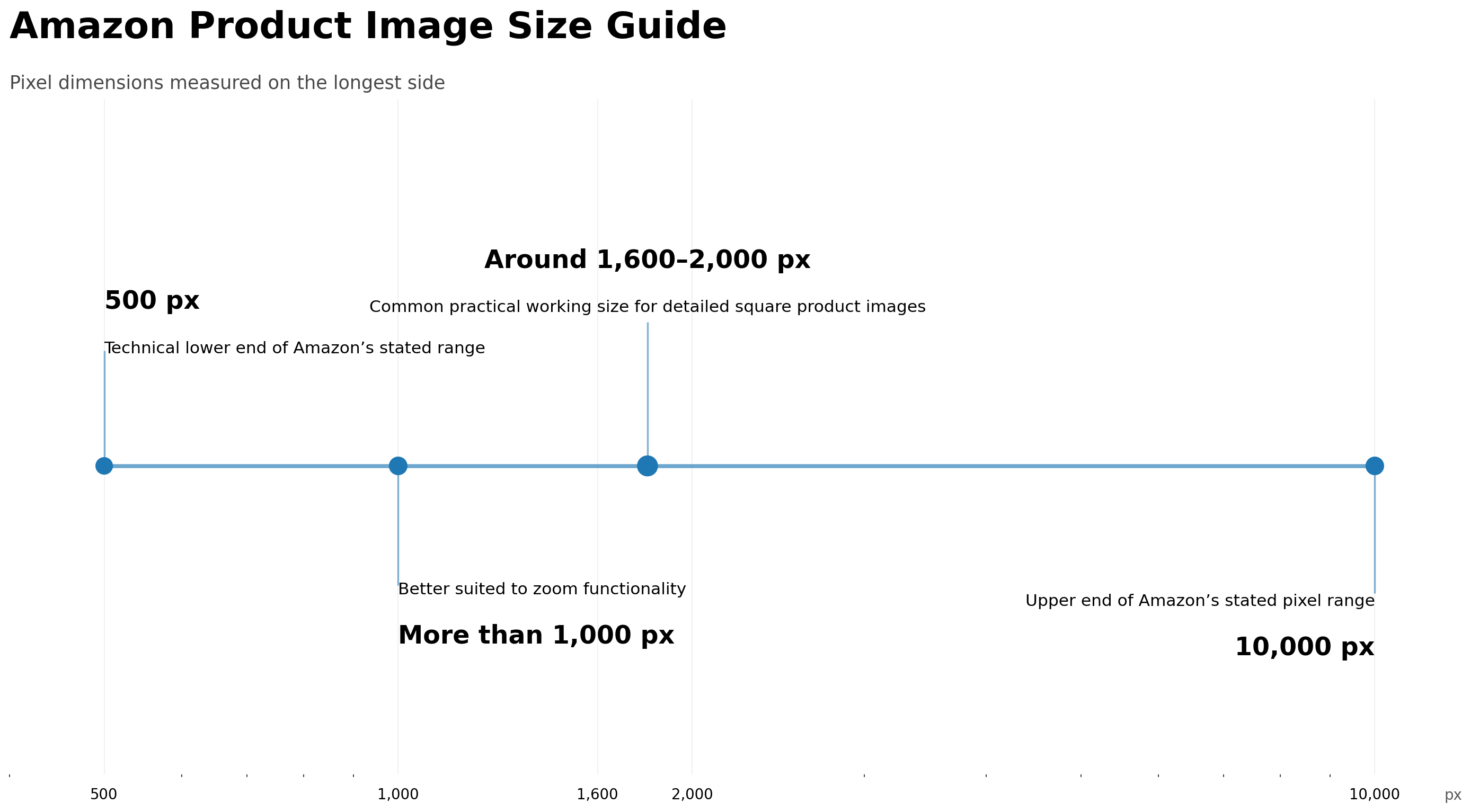
The 1,600–2,000 pixel range is a workflow recommendation, not a universal Amazon requirement. It gives designers and sellers enough resolution for retouching, clean edges, and zoom without creating an unnecessarily huge file.
Amazon commonly accepts JPEG, TIFF, PNG, and non-animated GIF formats. Images should be sharp, well lit, and free from pixelation or jagged cutout edges.
For most photographic product images, JPEG is usually the simplest choice. PNG can be useful during editing, especially when preserving transparency before placing the item on white, but the final image should still be reviewed as it will appear on Amazon.
The safest working setup for many standard products is a square RGB canvas, a pure white background, and an image size above 1,000 pixels. Amazon does not impose one universal aspect ratio across every category, so sellers should not assume that every product must be exactly 1:1. However, a square file is widely used because it works predictably across listing layouts and avoids awkward empty bars for many product types. Category-specific guidelines can still override general assumptions.
What You Can and Cannot Show in the Main Image
Most Amazon main image violations are not caused by file dimensions. They are caused by content.
Sellers often know that text and watermarks are not allowed, but uncertainty begins when the image includes packaging, branding, bundles, accessories, multiple product pieces, or objects used to demonstrate scale.
The most useful principle is this:
The main image should make the purchase clearer, not more persuasive at the cost of accuracy.
Added text, promotional graphics, and badges
A main image should not contain text added during design or editing. That includes obvious promotions such as “20% OFF,” but it also includes less aggressive additions such as “New Formula,” “Extra Large,” “BPA-Free,” “Two-Year Warranty,” or “Includes Carrying Case.”
Even when the claim is true, the main image is not the correct place for it.
The same applies to:
best-seller-style badges;
warranty icons;
certification graphics;
arrows and dimensions;
feature labels;
decorative brand logos in the corner;
colored banners;
comparison graphics;
watermarks;
borders or graphic frames.
Amazon’s image issue guidance specifically identifies text, logos, graphics, watermarks, and non-white backgrounds as common main-image problems.
There is an important distinction between branding that physically exists on the product and branding added to the image.
A logo printed on a cosmetic bottle, shoe, appliance, or retail package is part of the real product. A separate logo placed in the upper-right corner during editing is an added graphic. The first may be necessary for accurate product representation; the second can violate the image rule.
Props and accessories that are not included
Props are risky because they can change what the customer believes is included.
Suppose you sell a single ceramic mug. Showing it beside a bag of coffee beans, a spoon, and a gift box may create a more attractive lifestyle composition, but it can also suggest that the customer receives those items. That kind of scene belongs in a secondary image, where context can be explained more clearly.
The issue is not that every object near the product is automatically prohibited in every possible category. The issue is whether the main image accurately identifies the offer.
For example, a cookware set can show all the pans and lids included in the set. A bundle should show the items included in that bundle. A multipack may need to show the correct quantity. But a single pan should not be surrounded by utensils, ingredients, towels, and tableware that are not included.
A useful test is to show the image to someone unfamiliar with the listing and ask: “Based only on this image, what do you think arrives in the package?” If the answer includes items the customer will not receive, the image is too ambiguous.
Can packaging appear in an Amazon main image?
Packaging is more nuanced than many guides suggest.
Amazon has stated that main images should generally show products outside their packaging, while boxes, bags, or cases may appear when they are an important product feature.
That means “never show packaging” is too broad, but “packaging is always fine” is equally unreliable.
Retail packaging may be relevant when:
the packaging is part of the expected product presentation;
the item is sold primarily as a packaged consumable;
the box communicates the actual quantity or bundle;
the packaging itself is a meaningful part of the product;
the applicable category guidance allows or expects it.
Packaging becomes a problem when it dominates the image, hides the item unnecessarily, or creates uncertainty about whether the customer receives the product, the box, or both.
For food, beauty, supplements, books, collectibles, and multipacks, packaging may play a different role than it does for furniture, apparel, tools, or household goods. This is one reason category-specific guidance matters.
Multiple products, colors, and variations
Showing several objects is acceptable when those objects make up the actual sold set. It is misleading when they represent separate variations or optional items.
If a child ASIN is for a blue chair, the main image should not show blue, green, and beige chairs together simply to advertise available colors. Those alternatives can be presented in secondary images or through Amazon’s variation structure.
Likewise, do not show a six-piece arrangement if the customer receives only one item. Do not show two bottles when the listing quantity is one. Do not display an accessory set unless every visible component is part of the offer.
Variation accuracy is especially important because Amazon may associate images with parent and child listings. A technically perfect image can still be wrong if it is assigned to the incorrect color, size, pattern, quantity, or ASIN.
Compliant and Non-Compliant Examples
Rules become easier to apply when you look at the reason an image passes or fails.
Example 1: The background looks white but is actually gray
A skincare bottle is centered on a pale gray studio background. The product is sharp, the lighting is professional, and there is no added text.
At first glance, the image looks acceptable. However, the background samples at RGB 246, 246, 246 rather than 255, 255, 255.
Why it can fail: The main image background is not pure white.
How to fix it: Isolate the bottle carefully, replace the canvas with #FFFFFF, and inspect the edges for gray halos. Preserve a subtle natural product shadow only if it does not turn the surrounding background into a gray field.
Example 2: The product is compliant but too small
A kitchen appliance appears in the center of a 2,000 × 2,000 image, but it occupies less than half of the available area.
There are no obvious prohibited elements, yet the product is difficult to understand in search results.
Why it can fail or underperform: It does not dominate the frame and may not satisfy the expected product coverage. Even if it remains active, it wastes valuable thumbnail space.
How to fix it: Increase the appliance’s size while leaving enough breathing room to preserve the complete silhouette.
Example 3: A true claim is added as text
A seller adds “100% Recycled Material” beside a backpack. The claim is accurate and already appears in the listing copy.
Why it fails: The truth of the claim does not make added main-image text acceptable.
How to fix it: Use the clean backpack as the main image. Move the recycled-material message to a secondary infographic, product description, bullet point, or A+ Content section where permitted.
Example 4: The image includes an attractive but misleading scene
A desk lamp is photographed beside a notebook, plant, phone, and charging cable. The composition looks premium and demonstrates how the lamp can be used.
Why it fails as a main image: A shopper may not know which objects are included. The lifestyle setting also conflicts with the standard white-background presentation expected from a main image.
How to fix it: Use the lamp alone on white for image slot one. Keep the styled desk scene as a secondary lifestyle image.
Example 5: The bundle is shown correctly
A listing sells a three-piece bathroom organizer set. The main image shows all three pieces arranged clearly on white.
Why it can pass: Every displayed object is part of the actual offer, and the image helps the customer understand the bundle.
What still needs checking: The displayed quantity, color, and configuration must match the specific variation and category requirements.
Example 6: Several color options appear together
A listing is assigned to the black version of a handbag, but the main image shows black, brown, and cream versions side by side.
Why it fails: The image does not accurately represent the selected variation and may imply that the customer receives three bags.
How to fix it: Use only the black handbag for that child ASIN. Show the other color options elsewhere in the listing without confusing the purchase.
Example 7: The image uses an AI-generated product that changed shape
A seller uploads a reference photo of a chair to an AI image tool. The output looks polished, but the generated chair has slightly different armrests, a wider seat, and stitching that does not exist on the real item.
The background is pure white, and no text is present.
Why it is still a poor main image: Compliance is not only about backgrounds and graphic elements. The image no longer accurately represents the product.
How to fix it: Compare the result against the real product, correct structural differences, and reject any variation that changes materials, proportions, components, color, or included features.
Main Images and Secondary Images Have Different Jobs
One reason sellers overcrowd the main image is that they expect it to explain the entire product.
It cannot—and it should not.
The main image is designed to answer the shopper’s first question:
What is this product?
Secondary images can answer the questions that follow:
How is it used?
How large is it?
What are the most important features?
What does the material look like up close?
What is included?
How does it fit into a real environment?
Why should I choose it over another option?
Amazon recommends using multiple product images and has encouraged sellers to provide at least six images and one video where appropriate.
This gives sellers enough room to separate compliance from persuasion.
A strong image stack might begin with a clean, compliant main image and then continue with a detailed product angle, a lifestyle image, a dimensions graphic, a feature infographic, an included-items image, and a close-up of an important material or component.
This sequence is more effective than forcing every message into the first image.
The distinction also explains why not all Amazon images require white backgrounds. The main image normally does. Secondary images can often use lifestyle settings, colored backgrounds, product-in-use scenarios, text, and graphics, provided they remain accurate and follow Amazon’s broader content policies and applicable category requirements.
A secondary image still should not mislead the customer. It should not invent certifications, display an impossible result, make unsupported claims, or show a product configuration that does not exist. Greater creative freedom does not remove the requirement for accuracy.
Category-Specific Rules Can Change the Answer
General Amazon image rules provide a foundation, not the final answer for every listing.
Amazon maintains category style guides because the best way to present a necklace is not necessarily the best way to present a sofa, shoe, book, supplement, or clothing item. Those guides can include additional rules for image composition, model use, mannequins, product orientation, packaging, or minimum presentation standards.
Apparel is a clear example. Clothing guidelines may include expectations related to image proportions, how much of the frame the item occupies, professional photography quality, model positioning, or mannequin presentation.
Other categories that deserve extra review include:
shoes and accessories;
jewelry;
beauty and cosmetics;
books and media;
food and supplements;
furniture;
handmade products;
bundles and multipacks;
products with parent-child variations.
Marketplace differences also matter. A practice visible on Amazon.com is not automatically the correct standard for every Amazon marketplace. Sellers operating internationally should check the relevant Seller Central guidance for the country in which the ASIN is listed.
This is also why copying a competitor’s image is not a reliable compliance strategy.
You may find active listings with badges, props, colored backgrounds, oversized packaging, or multiple variations in the main image. Their presence does not prove that Amazon has formally approved the approach. Enforcement may be delayed, automated systems may not flag every listing at the same time, the category may follow a different convention, or the seller may eventually receive a suppression notice.
Use Amazon’s applicable guidance as your standard, not the most aggressive image you can find in the search results.
Why Amazon Main Images Get Rejected or Search Suppressed
A listing can be search suppressed when important information is missing or when the main image does not meet the required standard. Amazon’s own support materials direct sellers to replace non-compliant images and correct missing information to restore suppressed listings.
The frustrating part is that rejection messages are not always perfectly specific. A seller may receive a warning stating that Amazon detected text, a logo, a graphic, or a watermark even when the seller believes the image contains none.
When this happens, inspect the image rather than immediately assuming the system is wrong.
A product label may be interpreted as graphic text. An edge shadow may make the background appear non-white. Reflections can resemble a watermark. Packaging may contain promotional claims. The wrong variation image may have been assigned to the ASIN. A previous image may still be processing or cached.
A structured troubleshooting process is more effective than repeatedly uploading nearly identical files.
Start by opening the original image at full resolution. Check the background values, especially in the corners and around the product. Look for text outside the physical product, decorative icons, colored areas, borders, reflections, rough masking, and accessories that are not included.
Next, confirm that the image is attached to the correct ASIN and child variation. A compliant red-product image will not solve an issue if the listing is for the blue version.
Then check the category style guide. General image requirements may not explain a category-specific violation.
Prepare a genuinely revised version rather than simply exporting the same design under a new filename. Remove the suspected issue, save the file in an accepted format, and upload it through the appropriate Seller Central workflow.
Finally, review the listing status after the image has processed. If the issue continues despite a clearly compliant replacement, document the original warning, ASIN, uploaded file, and corrective steps when contacting Seller Support.
Here is a practical diagnosis table:
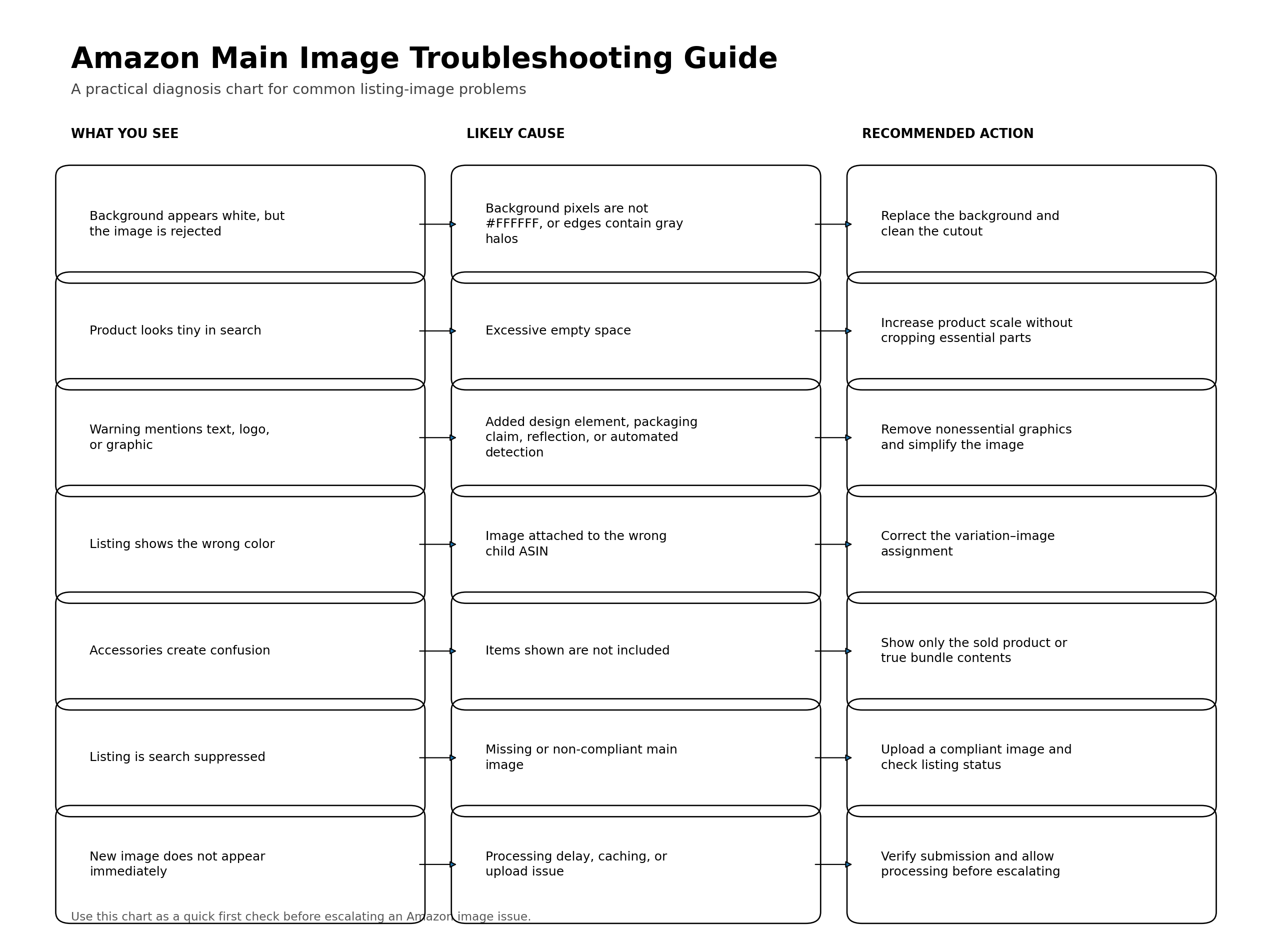
The goal is not to find a trick that bypasses Amazon’s detection. It is to create an image that is unambiguously compliant and accurate.
How to Build a Better Amazon Main Image Workflow
The easiest way to avoid repeated image problems is to make compliance part of the production process instead of checking it at the end.
Begin with a reliable product reference. This might be a professional photograph, manufacturer-approved image, accurate 3D render, or a set of product photos taken from several angles. The source material should clearly show the shape, colors, materials, branding, components, and packaging.
Before editing, confirm exactly what the listing sells. Is it one item, a set, a multipack, or a bundle? Which accessories are included? Which color and size belong to the child ASIN? This step sounds obvious, but many image errors begin because the designer receives incomplete product information.
Next, choose an angle that identifies the product quickly. The most visually dramatic angle is not always the most useful. For a chair, shoppers may need to understand the full silhouette. For a handbag, the front view may communicate the design better than an angled shot. For an electronic device, a slight three-quarter angle may reveal depth and controls without hiding the screen.
Clean the product edges carefully and place the item on a pure white canvas. Retain natural detail and avoid excessive retouching that changes texture, color, proportions, or branding.
Scale the product to fill the frame without clipping it. Then review both the full-size image and a small thumbnail. A large image can hide composition problems that become obvious at search-result size.
Export the final file in RGB color mode at a resolution suitable for zoom. Check it again after export because compression, color-profile conversion, or a last-minute design change can introduce issues.
Finally, compare the file against a checklist before upload.
CheckPass conditionProduct accuracyThe image matches the real item and selected variationBackgroundEmpty areas are pure white, RGB 255, 255, 255Product coverageThe product dominates the frame without awkward croppingAdded elementsNo added text, badge, border, watermark, or promotional graphicIncluded contentsEvery visible item belongs to the actual offerImage qualitySharp, clean, well lit, and free from pixelated edgesTechnical setupAccepted format, RGB mode, and suitable resolutionCategory complianceRelevant category and marketplace guidance has been checkedThumbnail clarityThe product remains understandable at a small size
This checklist is more valuable when it becomes a repeatable team process. A designer may focus on visual quality, while a marketplace manager checks ASIN accuracy and category rules. Both reviews are necessary.
Using AI to Create Amazon Product Images Without Misrepresenting the Product
AI-assisted product photography can speed up background removal, composition, retouching, variation creation, and secondary image production. It can also introduce new risks.
The biggest risk is not that an image “looks AI-generated.” The bigger risk is that it quietly changes the product.
An AI system may alter the number of buttons on an appliance, reshape a bottle cap, change the grain of a material, move a zipper, simplify a logo, invent packaging text, add an accessory, or create a color that does not match the actual variation.
These changes may be small enough to escape a quick review but significant enough to create false customer expectations.
Whether an image is photographed, rendered, or AI-assisted, the same standard should apply: it must accurately represent the item and comply with Amazon’s main image and category rules.
For a main image, AI is most useful when it supports controlled tasks such as:
placing an accurately preserved product on a pure white background;
cleaning imperfect edges;
improving resolution without inventing details;
correcting lighting while preserving true color;
resizing and positioning the item within the frame;
creating alternative layouts from approved product assets;
preparing secondary scenes without modifying the product itself.
The product should be treated as a fixed commercial asset, not as an open-ended visual suggestion.
A platform such as Adject can support this type of workflow by allowing ecommerce teams to work directly with reusable product assets, edit visuals in context, create variations, and keep related outputs inside the same project. The important advantage is not simply generating another image. It is being able to refine and reuse approved product visuals without restarting the process every time.
For Amazon sellers, that means one accurate product asset can become the foundation for a compliant white-background main image, secondary lifestyle scenes, feature-focused visuals, social content, and campaign variations. Each output can serve a different purpose while keeping the real product recognizable and consistent.
Human review is still essential. Before an AI-assisted main image is uploaded, compare it side by side with the real product and verify:
shape and proportions;
color and material;
logos and labels;
product quantity;
included accessories;
packaging;
visible functions and components.
A beautiful image that shows the wrong product is not an improvement.
Final Amazon Main Image Checklist
Before publishing, ask these questions in order:
Does the image show the exact product and variation the customer will receive?
Is the surrounding background truly RGB 255, 255, 255?
Does the product fill most of the frame without being cropped incorrectly?
Is the image free from added text, graphics, badges, borders, and watermarks?
Are all visible objects included in the purchase?
Does any packaging shown help clarify rather than confuse the offer?
Is the file sharp, clean, in RGB mode, and large enough for a good zoom experience?
Does the image follow the specific rules for the product category and marketplace?
Is the product still easy to recognize in a small mobile thumbnail?
Could a shopper reasonably misunderstand what they are buying?
If the answer to the final question is yes, the image needs another revision.
Amazon main image rules are not designed to make product listings visually boring. They are designed to make the first impression consistent and clear. The creative selling work can continue through secondary images, video, A+ Content, advertising, and brand storytelling.
A strong main image does not try to say everything.
It shows the right product, removes uncertainty, earns the click, and gives the rest of the listing a chance to do its job.


