
Fashion photography has always been one of the harder parts of running an ecommerce brand.
You can have the product ready, the store built, and the launch campaign planned, yet still spend days or weeks coordinating models, photographers, studios, styling, retouching, and reshoots just to get a collection online.
AI fashion model generators are changing that workflow.
Instead of organizing a new photoshoot for every colorway, SKU, or campaign idea, brands can now turn existing clothing photos into realistic on-model images, create new model variations, change backgrounds and poses, and in some cases generate entire campaign sets from a single product image.
The difficult part in 2026 is no longer finding an AI fashion model generator.
It is choosing the right one.
Some tools are excellent at turning flat lays into ecommerce-ready model photography.
Others focus on model consistency across large catalogs.
Some are built around APIs and bulk production, while broader AI product photography platforms are better suited to brands that also need ads, lifestyle scenes, social creatives and product videos.
We reviewed the current capabilities, workflows, pricing structures, ecommerce features, commercial-use options, and scaling tools available across leading platforms.
Here are the best AI fashion model generators for ecommerce brands in 2026.
Best AI Fashion Model Generators at a Glance
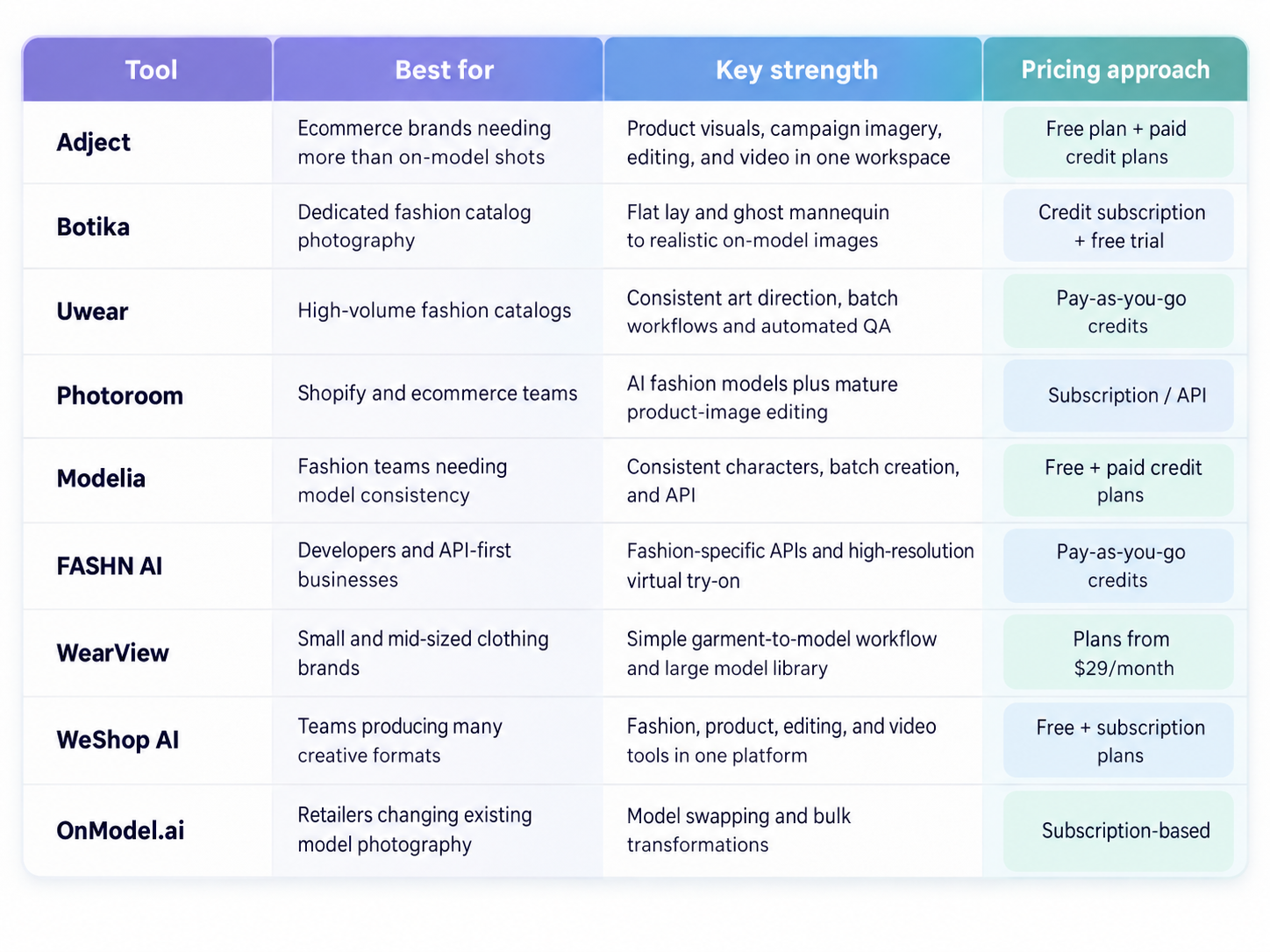
There is no single best platform for every fashion brand.
The right choice depends on what you are starting with, how many images you need to produce, and how closely the generated output must match your existing visual identity.
1. Adject — Best for Ecommerce Brands That Need More Than AI Models
Best for: Ecommerce brands that want product photography, lifestyle visuals, fashion imagery, ads, and video inside one workflow.
A dedicated AI clothing model generator solves one problem: putting clothing on a model.
Most ecommerce brands have more than one problem.
They need product-page images, campaign creatives, lifestyle photography, paid social variations, marketplace assets, promotional graphics, and increasingly short-form video as well.
That broader workflow is where Adject becomes particularly interesting.
Adject describes itself as an AI studio built specifically for ecommerce rather than a general-purpose AI image generator.
Brands upload their products and can build, edit, and scale realistic product visuals from the same workspace.
Its supported categories include apparel and fashion alongside beauty, jewelry, furniture, packaged goods, and electronics.
For a fashion brand, that means your workflow does not have to end after generating an AI model wearing a garment.
The same product references can be used to create studio imagery, lifestyle scenes, campaign concepts, marketplace assets, and videos.
Why Adject stands out
A common weakness of general AI image generators is product drift.
The image may look impressive while subtly changing the logo, stitching, proportions, color, label, or shape of the actual product.
That is a much bigger issue in ecommerce than it is in creative AI art.
Adject is designed around product-reference accuracy and specifically emphasizes preservation of product shape, logos, colors, textures, and brand details.
It also uses templates and guided workflows rather than requiring sellers to become expert prompt engineers.
Another advantage is iteration.
You can create multiple creative directions around the same product instead of rebuilding an image from scratch every time you want a new background, composition, or campaign variation.
That makes Adject especially useful for brands constantly testing creatives across:
Shopify product pages
Amazon and marketplace listings
Meta ads
Instagram
TikTok
Pinterest
email campaigns
seasonal promotions
The platform offers a free tier, while paid plans add larger credit allowances, image and video model access, commercial licensing, and higher-volume workflows.
Best fit
Choose Adject if your real problem is not simply:
“I need an AI model wearing this shirt.”
but rather:
“I need to turn this product into enough visual content to run an ecommerce brand.”
That broader distinction matters.
Pros
Built specifically around ecommerce product visuals
Supports fashion alongside other product categories
Images and video in the same environment
Product-detail preservation is a core part of the workflow
Templates reduce dependence on prompt engineering
Useful for ads, social content and lifestyle visuals as well as product pages
Commercial rights available on paid plans
Things to consider
Adject is broader than a fashion-only platform.
Brands whose entire workflow revolves around high-volume garment-to-model catalog conversion may prefer a specialist such as Botika or Uwear.
2. Botika — Best Dedicated AI Fashion Model Generator for Catalog Photography
Best for: Clothing brands that primarily want to turn existing garment photography into polished on-model ecommerce images.
Botika is one of the most recognizable specialist platforms in AI fashion photography.
Rather than trying to be a general creative tool, it focuses heavily on apparel.
You can start with an existing model image, flat lay, or ghost mannequin photo and transform it into realistic on-model content.
Botika says its current workflow supports more than 150 AI-generated models and can also generate fashion videos from still imagery.
This specialization makes it appealing for ecommerce teams that already have decent product photography but lack enough model imagery.
Where Botika is strong
Its flat lay to model workflow is particularly relevant.
Instead of photographing every garment on a person, a brand can photograph the garment itself, select an AI fashion model and background, and generate an on-model version.
The same applies to ghost mannequin photography.
Botika supports front, back, and side garment views, which is useful when creating complete PDP galleries rather than a single hero image.
Botika also keeps the workflow relatively controlled.
It does not rely heavily on open-ended text prompting.
Users select from available models, poses, and backgrounds.
That may feel restrictive to creative teams, but for ecommerce catalog production it can actually make results more predictable.
Its current documentation says each generated photo costs one credit, while video generation costs five credits.
New users can test the platform with free trial credits, and generated images can be used commercially subject to Botika's terms.
Best fit
Botika makes the most sense when fashion model photography itself is the bottleneck.
If you already have hundreds of garment photos and mainly need to convert them into polished AI clothing model images, Botika deserves a serious look.
Pros
Fashion-specific workflow
Flat lay to model
Ghost mannequin to model
Large AI model library
Front, back and side imagery
Fashion video generation
Commercial ecommerce usage supported
Things to consider
Botika intentionally offers less open-ended prompting than more creative AI studios.
That makes it easier to control, but less flexible for brands that want unusual campaign concepts or complex art direction.
3. Uwear — Best for Large Catalogs and Consistent AI Fashion Photography
Best for: Fashion ecommerce teams producing hundreds or thousands of images while maintaining the same visual direction.
Generating one convincing AI fashion model image is not particularly difficult anymore.
Generating 3,000 images that all look like they came from the same brand is much harder.
This is where Uwear takes a different approach.
Rather than treating each generation as an isolated prompt, Uwear allows brands to save art direction covering elements such as casting, lighting, and framing, then reuse that direction across future production.
Its platform supports packshots, ghost mannequin photos and supplier images as inputs and can turn them into on-model photography and video.
It also includes batch workflows, APIs, production automation and AI-based quality checks.
Why model consistency matters
Imagine a Shopify store with 300 garments.
If every product image uses a different camera angle, model style, background and lighting setup, the store quickly feels inconsistent—even when each individual image looks realistic.
A good AI fashion photography workflow therefore needs more than photorealism.
It needs repeatability.
Uwear's saved art direction is designed to keep the visual system consistent across a catalog.
The platform also offers AI review functionality that checks generated results against product images and can retry images that fail configured quality criteria.
For larger retailers, this type of automated QA can matter just as much as the generation model itself.
Pricing is straightforward: self-service credits currently cost $0.10 per credit, do not expire, and work across its Studio, API and MCP workflows.
Uwear says fashion photos start from three credits depending on the selected model, with a minimum self-service credit purchase of $17.
Best fit
Uwear is less about generating a few social posts and more about building a repeatable visual-production system.
That makes it particularly attractive for brands with large SKU counts, frequent product drops, multiple suppliers or an existing PIM/DAM-based workflow.
Pros
Strong model and visual consistency
Saved art direction
Batch production
API
Automatic QA and retries
Image and fashion video generation
Pay-as-you-go pricing
No expiring credits
Things to consider
Smaller sellers that only need a handful of images may not need the production infrastructure Uwear is built around.
4. Photoroom — Best for Shopify Sellers and Product Photography Workflows
Best for: Ecommerce teams that want AI fashion models alongside background removal, editing and broader product photography tools.
Photoroom has been widely used for product photography for years, and its AI Fashion Models feature extends that workflow into on-model fashion content.
Users can upload clothing imagery such as flat lays or ghost mannequin photos and place the garment onto AI-generated models.
Model appearance, pose, background and other visual elements can then be adjusted.
The advantage is not simply the model generator itself.
Photoroom already includes tools for background removal, background generation, resizing, lighting and ecommerce image editing.
That can reduce the number of applications a small content team needs to use.
Strong Shopify workflow
Photoroom also offers a Shopify workflow that allows merchants to sync products and generate AI fashion model imagery for their catalog.
Brands can choose a product, configure an AI model and then use the resulting image in Shopify listings.
For larger organizations, its Fashion Models capability is also accessible through the Photoroom API, allowing ecommerce teams to automate catalog production across large numbers of SKUs.
Best fit
Photoroom works well for teams that want a familiar ecommerce photo-editing environment rather than a fashion-only generation platform.
Pros
AI fashion models
Flat-lay and product-image workflows
Shopify support
Mature product photo editing
Background generation and removal
API access for larger catalogs
Web and mobile workflows
Things to consider
A fashion-specific platform may provide deeper fashion production controls if your entire creative pipeline revolves around apparel.
5. Modelia — Best for Consistent AI Models Across Campaigns
Best for: Brands that want recurring AI characters, batch generation and fashion-specific creative tools.
Modelia sits somewhere between a fashion model generator and a broader fashion creative studio.
One of its most useful ecommerce features is consistent characters.
Instead of creating a completely different person for each product, brands can establish reusable AI models and show multiple products on the same recognizable character.
That can be useful for lookbooks, seasonal collections, social campaigns and brands trying to create a stable visual identity.
Modelia also supports batch generation and API access on its higher plans.
Its API includes a dedicated flat-lay-to-model workflow, with controls for model description, background, aspect ratio and output resolution.
Pricing
Modelia currently offers a free Starter plan with 20 monthly credits, although images on that tier are watermarked and intended for non-commercial use.
Paid options include a $12 one-time Project plan, a Basic plan at $35/month, Pro at $85/month and Business at $300/month.
Paid tiers add commercial usage rights, 4K exports and varying levels of consistent-character, batch and API access.
Best fit
Modelia is particularly interesting for teams that care about recurring virtual fashion models rather than randomly generated people in every image.
Pros
Consistent AI characters
Flat lay to model
Up to 4K exports
Batch generation
Public API on qualifying plans
Fashion-specific ecosystem
Free plan for testing
Things to consider
The free plan is not intended for commercial production, so ecommerce brands should compare paid tiers based on expected monthly output.
6. FASHN AI — Best Fashion AI API for Developers
Best for: Ecommerce platforms, apps and technical teams building AI fashion generation directly into their own product.
FASHN AI is one of the more developer-oriented tools on this list.
Instead of simply providing a visual editor, it offers a suite of fashion-specific APIs covering workflows such as:
Product to Model
Model Create
Model Swap
Face to Model
Virtual Try-On
image editing
reframing
background removal
image-to-video
Its Try-On Max system is specifically designed for publishable ecommerce and fashion content and supports clothing as well as shoes, hats, jewelry, bags and other wearable products.
Garment fidelity and resolution
Product accuracy is one of the hardest parts of AI clothing photography.
A beautiful model image is useless if the AI changes a logo or turns a five-button jacket into a four-button jacket.
FASHN's higher-quality generation modes prioritize details such as texture, fabric, logos and garment cuts, and its API can generate outputs up to 4K depending on the selected endpoint and mode.
Pricing is usage-based.
On-demand API credits currently cost $0.075 each with a $7.50 minimum purchase, while different generation modes consume different numbers of credits.
Commercial use is permitted for API-generated output under FASHN's stated terms.
Best fit
FASHN is one of the strongest candidates when AI model generation needs to become part of your own software or automated ecommerce infrastructure.
Pros
Fashion-specific REST API
Product-to-model generation
Model creation and model swap
Up to 4K output
Virtual try-on
Background tools
Video
Flexible usage-based pricing
Commercial use supported
Things to consider
Non-technical teams may find a visual platform such as Botika, Adject or Photoroom easier to operate day to day.
7. WearView — Best for Straightforward Garment-to-Model Generation
Best for: Small and mid-sized fashion brands wanting an uncomplicated AI model photography workflow.
WearView focuses heavily on a simple promise:
Upload a garment, choose a model, and generate on-model photography.
The platform says it supports more than 100 AI fashion models across different ages, appearances and body types, along with pose and background controls.
Garments can start from flat-lay, hanger or existing on-model photos.
That simplicity can be valuable.
Not every clothing brand needs APIs, automated QA systems or complicated creative canvases.
Sometimes you simply need to turn a supplier photograph into something that looks suitable for your Shopify store.
WearView also states that generated assets include commercial usage rights and can be used across Shopify, Amazon, social media, advertising and print.
Current plans are advertised from $29 per month.
Best fit
WearView is worth considering if ease of use matters more than building a complicated production pipeline.
Pros
Simple workflow
100+ AI models
Model, pose and background selection
Flat-lay support
High-resolution output
Commercial usage
Ecommerce-oriented
Things to consider
Larger catalog teams should compare its bulk workflow and consistency controls carefully with production-focused alternatives.
8. WeShop AI — Best for Multi-Format Ecommerce Creative Production
Best for: Teams that want fashion model generation alongside product editing, styling, creative generation and video tools.
WeShop AI is another broader ecommerce creative platform.
Its AI Fashion Model tool can generate model imagery from flat-lay clothing and other apparel references while allowing brands to explore different model styles, sizes, poses, backgrounds and aesthetics.
The platform goes further with tools for virtual try-on, face swapping, pose changes, product generation and multiple video engines.
This makes it more useful for brands whose visual requirements extend beyond standard product photography.
WeShop currently has a free tier, with paid plans beginning at $9.90/month and larger Ultra and Enterprise options for higher-volume use.
Different agents consume different numbers of platform points.
Best fit
WeShop makes sense for growth and content teams experimenting with many different AI workflows rather than focusing entirely on one standardized catalog pipeline.
Pros
AI fashion models
Virtual try-on
Pose changes
Product generation
Multiple image and video models
Free tier
API access on higher plans
Things to consider
The large number of models and tools can make the pricing system more complicated than platforms built around a single image-generation workflow.
9. OnModel.ai — Best for Replacing Models in Existing Product Photos
Best for: Ecommerce sellers that already have on-model supplier photography but want different models without reshooting the garments.
OnModel.ai solves a slightly different problem from many flat-lay-to-model tools.
Instead of generating an entirely new photoshoot, it is especially focused on model swapping.
Brands can take an existing product image and replace the person while retaining the clothing.
Controls include elements such as gender, ethnicity, age and appearance.
It can also generate missing faces for cropped supplier images, change backgrounds and process images in bulk.
This can be particularly useful for resellers.
If dozens of stores use identical supplier photography, changing the model and visual presentation gives the product page a more differentiated look without requiring a new physical photoshoot.
Best fit
Choose OnModel.ai if you already have acceptable model photography and your main goal is to adapt who appears in the image.
Pros
AI model swapping
Demographic customization
Background changes
Face completion for cropped images
Bulk processing
Shopify-oriented use case
Things to consider
Brands starting primarily from flat lays or building heavily art-directed campaign photography may prefer platforms with broader generation tools.
What Should You Look for in an AI Fashion Model Generator?
The best AI clothing model generator is not necessarily the one that produces the most impressive demo image.
For ecommerce, six other factors matter just as much.
1. Garment Fidelity
Start here.
Does the generated image actually preserve your product?
Pay attention to:
logos
typography
stitching
buttons
pockets
patterns
neckline
sleeve length
fabric texture
colors
silhouette
A photorealistic AI model wearing an inaccurate version of your product is not good ecommerce photography.
For important SKUs, compare generated outputs side by side with the original product image before publishing.
2. Model Consistency
Ask whether you can use the same AI model across different outfits.
Consistency matters more as your catalog grows.
A store where every SKU appears on a completely unrelated model, with different lighting and camera treatment, can quickly lose visual cohesion.
Tools with reusable characters, saved art direction or repeatable presets are particularly valuable here.
3. Batch Generation
Generating ten images manually is easy.
Generating 5,000 is an operations problem.
Larger ecommerce brands should look for:
batch processing
bulk uploads
APIs
workflow automation
consistent presets
review queues
quality control
The fastest individual generator is not necessarily the fastest production system.
4. Creative Control
Some platforms give you a fixed model library.
Others let you control:
poses
environments
backgrounds
model characteristics
lighting
framing
campaign style
Neither approach is inherently better.
Controlled systems tend to be easier for catalog work, while more flexible systems are better for campaigns and advertising.
5. Commercial Rights
Never assume AI-generated images automatically come with unrestricted commercial rights.
Check the platform's current terms before using generated models in ecommerce listings, paid advertising, print campaigns or client work.
This becomes especially important for agencies producing assets for multiple brands.
6. Image and Video in One Workflow
Fashion ecommerce is moving beyond static PDP images.
The same brand may now need:
catalog photography
Instagram posts
Meta ads
TikTok videos
Pinterest creatives
product reels
campaign imagery
If that describes your content operation, an AI studio that supports both images and video may provide more value than a narrowly focused model generator.
What Can You Turn Into an AI Fashion Model Photo?
One reason these tools are becoming useful for ecommerce is that you do not necessarily need professional source photography.
Depending on the platform, you may be able to start with:
Flat Lay → AI Model
Photograph the garment on a clean surface and generate a model wearing it.
This is one of the most useful workflows for small clothing brands and print-on-demand sellers.
Ghost Mannequin → AI Model
Existing ghost mannequin catalog photography can often be converted into human on-model imagery.
This lets brands reuse previous product assets instead of reshooting an entire catalog.
Hanger Photo → AI Model
Some AI clothing model generators can work with simple hanger or supplier photos.
Results depend heavily on the quality and visibility of the garment.
Existing Model → New Model
Model-swap tools allow brands to preserve the garment, pose and general composition while changing the person wearing the product.
Product Image → Lifestyle Campaign
Broader AI product photography platforms can take the process further by placing products into campaign environments, creating new backgrounds and producing social or advertising variations.
AI Fashion Model Generator vs. Traditional Fashion Photoshoot
AI fashion photography does not automatically make traditional photography obsolete.
The two workflows are good at different things.
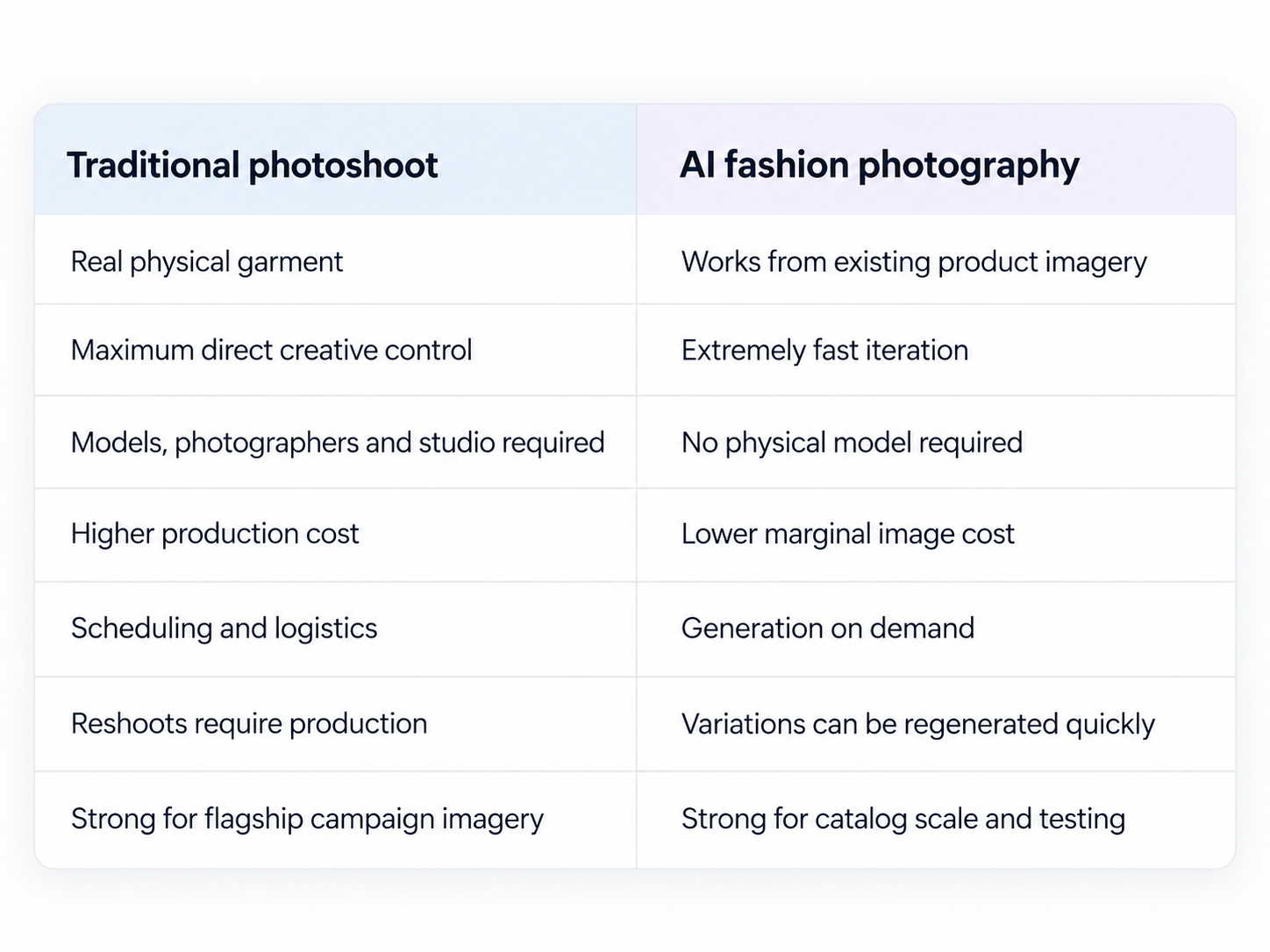
Traditional fashion photography still makes sense when the physical interaction between garment, model, fabric and environment is central to the creative idea.
AI becomes particularly powerful when the problem is scale.
A brand launching 200 SKUs may still choose a traditional shoot for its hero campaign while using AI-generated fashion models for additional PDP images, localization, testing, marketplace variations and social creative.
The strongest workflow does not always have to be AI versus photography.
It can be AI plus photography.
AI Fashion Model Generator vs. Virtual Try-On
These terms are often used interchangeably, but they describe different workflows.
An AI fashion model generator is primarily a merchant-side content production tool.
The brand uses AI to create product imagery showing clothing on generated or modified models.
A virtual try-on tool is primarily shopper-facing.
The customer provides their own photo or body reference and sees an approximation of how a garment might look on them.
For example, Photoroom now offers both AI Fashion Models for merchant content creation and a separate Virtual Try On product that can be integrated into ecommerce experiences.
FASHN similarly provides both product-to-model generation and virtual try-on endpoints.
If your goal is creating a product catalog, look for an AI fashion model generator.
If your goal is letting shoppers visualize themselves in the product, look for virtual try-on.
How Ecommerce Brands Can Use AI Fashion Models
AI-generated models are useful well beyond replacing one studio photoshoot.
Create PDP Images Before Samples Reach the Studio
When you already have usable garment photography, AI can help create on-model assets without scheduling another production day.
Localize Fashion Imagery
Brands selling internationally can test different model representation across markets without organizing independent shoots for every region.
Produce More Creative Variations
One product can be shown with different models, backgrounds, compositions and campaign aesthetics.
That gives marketing teams more material for creative testing.
Refresh Old Catalogs
Older flat lays and ghost mannequin images can be turned into more contemporary on-model photography.
Build Lookbooks Faster
Instead of coordinating every garment combination physically, teams can explore looks digitally before deciding which concepts deserve full campaign production.
Create Paid Social Variations
AI makes it practical to test several different visual directions around the same SKU.
For performance marketers, that may be more valuable than simply reducing photography costs.
Are AI Fashion Models Good Enough for Ecommerce in 2026?
For many ecommerce applications, yes.
But that does not mean every generation should be published automatically.
Even strong AI fashion photography systems can struggle with unusually complex products, including:
transparent fabrics
highly reflective materials
intricate embroidery
small text and logos
layered garments
unusual straps
jewelry interacting with skin
complicated footwear
asymmetric designs
This is why garment fidelity should be checked against the original product.
AI should reduce production work—not remove quality control.
For high-value hero imagery, a hybrid workflow can still be the safest option: use traditional photography where physical precision matters most and AI for catalog expansion, testing and secondary content.
Which AI Fashion Model Generator Is Best?
The answer depends on the workflow.
Choose Adject if you want fashion visuals as part of a broader ecommerce content engine covering product imagery, campaigns, ads and video.
Choose Botika if your primary goal is converting clothing photography into dedicated on-model fashion content.
Choose Uwear if you manage a large catalog and model consistency, automation and QA are major priorities.
Choose Photoroom if you want AI models integrated into a broader product-photo workflow, especially around Shopify.
Choose Modelia if reusable characters and consistent AI models matter to your brand.
Choose FASHN AI if you are building fashion generation or virtual try-on into your own product through an API.
Choose WearView if you want a straightforward garment-to-model workflow without much operational complexity.
Choose WeShop AI if your team wants access to many different ecommerce image and video workflows.
Choose OnModel.ai if your existing photography is good but you want to replace or diversify the models appearing in it.
Final Thoughts
The biggest shift in AI fashion photography in 2026 is not that AI can generate realistic people.
We have been able to do that for a while.
The important shift is that these tools are becoming production systems.
They can take real garment references, preserve product details, reuse models, process catalogs, generate variations, connect to ecommerce workflows and turn one product into dozens of pieces of visual content.
For ecommerce brands, that changes the question.
It is no longer:
“Can AI generate a fashion model?”
It is:
“Which parts of our visual production workflow no longer need a photoshoot?”
For some brands, the answer may be only a few secondary product images.
For others, it may include most of the catalog, social creative, advertising variations, localization and short-form video.
That is why choosing the best AI fashion model generator is less about finding the most impressive single image and more about finding the platform that fits the way your brand actually produces content.
The best tool is the one that can preserve your product, match your visual identity, scale with your catalog and still give your team enough control to make the final image feel like your brand, not just another AI-generated fashion photo.

