
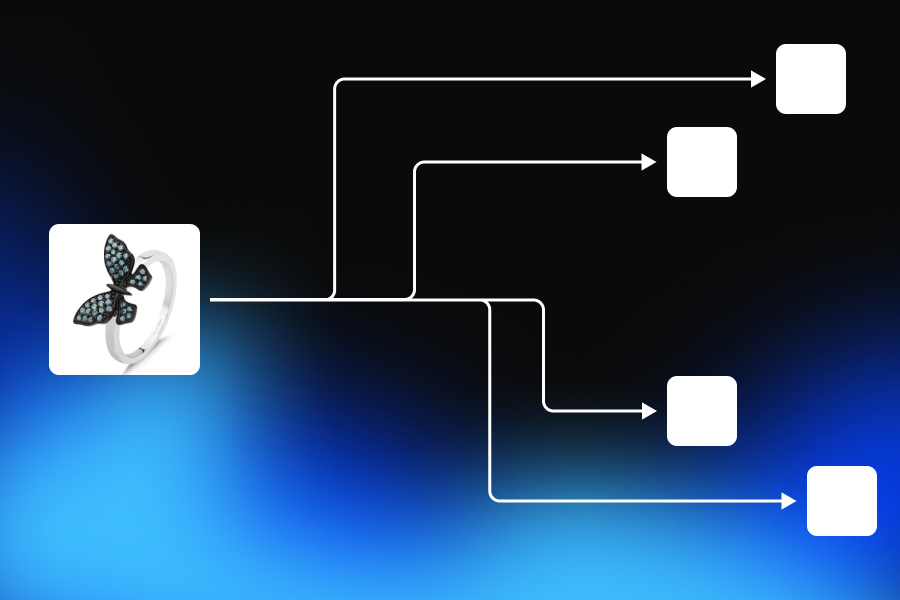
A product photo is rarely used only once. The same product may need a clean image for its Shopify page, a white-background composition for a marketplace, a lifestyle scene for social media, a vertical creative for advertising, a wide image for a website banner, a seasonal version for a campaign, and several alternative visuals for testing. The product stays the same. The visual requirements keep changing.
Traditionally, producing this amount of content could mean organizing multiple studio setups, finding props, preparing different backgrounds, arranging models, retouching every selected photo, and adapting the final files for each platform. Even when a brand already has a strong product photo, turning it into a complete content library can become a separate production project. AI product photography changes that workflow. A single source photo can become the foundation for multiple product visuals without physically rebuilding every scene. But that does not mean 25 usable images appear instantly after one prompt.
There is still creative planning. There are unsuccessful generations. Product details must be reviewed. Some images need to be adjusted, while others should be rejected completely. The final files still have to be prepared for the channels where they will appear. So the important question is not:
Can AI generate 25 images from one product photo?
It can. The more useful question is:
How much time and money does it take to turn one product photo into 25 commercially usable ecommerce images?
To answer that honestly, we need to look beyond generation speed and examine the complete production workflow.
Twenty-Five Images Should Not Mean Twenty-Five Random Backgrounds
It is easy to create the illusion of scale with AI. Upload a product, place it in several environments, change the background repeatedly, and count every result as a new asset. The final folder may contain 25 images, but that does not mean the brand now has a useful visual library. A commercially valuable image set needs structure.
Some images should help customers recognize the product immediately. Others should explain how it fits into a real environment. Some may focus on materials, features, packaging, or scale. Advertising visuals need room for campaign copy. Social media images need compositions that remain clear on smaller screens. Website banners often need more negative space and a wider visual balance.
A realistic 25-image production plan might include a small group of clean hero images, several lifestyle scenes, product detail compositions, in-use visuals, campaign concepts, social advertising variations, and wider website assets. The exact distribution will depend on the product and the brand.
A furniture company may need room scenes that show scale and interior style. A cosmetics brand may need clean studio images, ingredient-inspired compositions, texture visuals, and campaign assets. A jewelry business may prioritize close-ups, model images, gifting scenes, and premium editorial lighting. An apparel brand may need a combination of product-only images, on-model content, lifestyle photography, and seasonal variations. The goal is not to prove that AI can change a background 25 times.
The goal is to give one product enough visual depth to support different commercial situations. That distinction affects both time and cost. Twenty-five simple background replacements are not the same production as 25 images with different purposes, formats, compositions, and quality requirements.
The Source Photo Is the Foundation of the Entire Workflow
The quality of AI product photography begins before the first generation. It begins with the information visible in the original product image. The source photo does not need to look like an expensive campaign shoot. It does, however, need to communicate the product clearly enough for the system to understand what must remain unchanged.
The overall silhouette should be visible. Important edges should not disappear into the background. The real color should be represented reasonably well. Logos, labels, packaging elements, buttons, clasps, textures, seams, openings, and other distinctive details should be sharp enough to examine. This is especially important because AI can create a convincing image while quietly changing the product.
A bottle can become slightly taller. A chair leg can change shape. A logo can lose a letter. A necklace can gain an additional stone. A jacket pocket can move. A cosmetic package can keep the correct general appearance while changing the small text on its label.
The result may still look photorealistic. It may simply no longer represent the product being sold. A clear source image reduces this uncertainty. It gives the system a stronger visual reference and gives the person reviewing the results a reliable standard against which every output can be compared.
For products with a simple and clearly visible shape, one photograph may be enough to begin generating useful front-facing variations. For more complex products, additional reference images may be necessary.
A single front image cannot reveal the exact structure of the back of a handbag. It cannot confirm how a chair looks from the side. It cannot show the closure of a necklace that is hidden behind the product. It cannot provide precise construction information about parts of a garment that are folded or cropped. AI may create a plausible interpretation of those missing details, but plausible is not the same as accurate.
This is why “from one photo” should not be interpreted as a promise that every possible angle can be reconstructed perfectly. It means one reliable product image can become the starting point for a much larger range of commercially useful visuals, particularly when the product remains in a similar orientation and the surrounding scene changes.
The First Generation Is Only the Beginning
AI product photography is often promoted through the speed of the first result. A product is uploaded, a scene is described, and a new visual appears. That moment is impressive, but it represents only a small part of a complete ecommerce production workflow. The first generation answers one question:
Can this visual direction work?
It does not answer whether the brand now has a complete image set.
Before expanding a direction into multiple variations, the initial result needs to be reviewed carefully. The product should be compared with the source image. The lighting should make sense. The scale should feel credible. The background should support the product rather than overpower it. The composition should match the intended platform.
If the direction works, it can be developed further. A successful clean studio visual may become the basis for several product-page images. A strong lifestyle scene may be adapted into vertical and square compositions. A campaign concept may evolve into advertising variations, website banners, and seasonal content. If the direction does not work, producing more versions of it only creates more files to reject later.
This is one reason experienced creative teams do not begin by generating dozens of unrelated images. They establish a small number of strong visual directions first, approve them, and then scale what works. The difference seems minor, but it changes the economics of the entire project. Without a clear approval process, AI makes it extremely easy to produce more content than the team can meaningfully evaluate. Generation becomes fast while decision-making becomes slow.
The real production bottleneck moves from creating images to selecting, reviewing, correcting, and organizing them.
Where the Time Actually Goes
The amount of time needed to produce 25 AI product images depends on much more than the speed of the image model. A complete workflow usually contains five different forms of work.
Preparing the Product
The source image has to be inspected before it is used.
The product may need to be cropped more carefully. The background may need basic cleanup. The color may need correction. A higher-resolution version may need to be found. The team may realize that a second reference image is necessary to show a hidden detail.
This stage may be short, but skipping it often creates much more work later.
Defining the Visual Plan
The team needs to decide what the 25 images are for. Without a plan, the workflow becomes a collection of visual experiments. With a plan, each approved image fills a specific need. The creative direction should answer practical questions.
Should the product feel premium or accessible? Should the scene look minimal, natural, technical, playful, clinical, luxurious, or editorial? Who is expected to buy it? Where will the image appear? Does the composition need empty space for text? Which product details must remain completely accurate?
AI does not remove the need for these decisions. It makes it faster to explore the decisions once they have been made.
Generating and Developing the First Directions
The first outputs are used to test the product inside different visual environments.
Some directions will work immediately. Others may feel visually attractive but wrong for the brand. A scene may be too busy. The lighting may hide important product details. The background may create the wrong price perception. The product may feel too small, too large, too formal, or too artificial.
The team may need to adjust the instruction, modify the composition, or try a different creative approach. This is not necessarily wasted work. Creative exploration is part of production. But it should still be included when calculating how long the project took.
Reviewing Product Accuracy
Quality control is often the most underestimated part of the process. Every image has to be checked against the original product. Small inconsistencies are easier to miss when the surrounding scene is visually impressive. A reviewer should inspect shape, dimensions, colors, logos, labels, packaging, material, texture, shadows, reflections, and contact with the environment. The reviewer should also ask whether the image creates an inaccurate expectation.
Does the product appear larger than it really is? Does a material look more expensive or more transparent than the physical item? Does an on-model visual suggest an exact fit that has not been verified? Does a lifestyle scene imply a feature or use case the product does not actually have? This review takes time because commercial accuracy cannot be delegated entirely to the generation system.
Preparing the Final Files
Approved images still need to be adapted for their intended channels. A composition that works as a square product visual may not work as a vertical advertisement. Cropping it mechanically can make the product appear too small or cut off important elements. A wide website banner may need the product positioned to one side so that text can be added later. The best approach is often to create or adjust the composition for the intended format rather than simply exporting the same image in several dimensions.
Files may also need to be renamed, compressed, organized, and checked for consistency before they are published or sent to another team. All of this is production time.
Hands-On Time and Elapsed Time Are Not the Same
AI production time should be measured in two different ways. Hands-on time is the period during which a person is actively working. This includes preparing the source image, planning the visual set, writing creative instructions, reviewing outputs, requesting changes, editing compositions, and exporting files. Elapsed time is the complete period from the beginning of the project to the final delivery. It includes generation and processing periods, even when the person is not actively working during every minute.
This distinction matters because both numbers answer different business questions. Hands-on time shows the actual labor investment. Elapsed time shows how quickly the complete asset set can be delivered. A workflow might require two hours of active human work but take three hours from beginning to end because some generations are processing while the user reviews other images. Another workflow might have a similar elapsed time but demand constant attention throughout the entire process.
Calling both workflows “three hours” would hide an important operational difference. For an internal team, labor time often has a greater effect on cost than elapsed time. For a campaign with a strict deadline, total elapsed time may matter just as much. A useful time analysis should therefore report both.
Quality Control Is Not an Optional Final Step
The most expensive AI output is not always the one that uses the most credits. It may be the image that looks good enough to publish but represents the product incorrectly. An inaccurate product image can create confusion, customer complaints, higher return rates, and a loss of trust. Even when the mistake appears visually small, it can affect how customers understand the item. This is why quality control should be part of the workflow from the first generation rather than a final check performed after all 25 images have been created.
The review process can be divided into three outcomes. An image may be approved because both the product and composition are accurate. It may be refined because the core result works but a small issue needs to be corrected. Or it may be rejected because the product has changed too much, the scene is commercially weak, or correcting the result would take more effort than creating a new variation. Rejecting an image is not evidence that the entire workflow failed.
Traditional photography also involves contact sheets, rejected frames, retouching decisions, and images that never become final assets. The difference is that AI can produce many alternatives very quickly, which makes it even more important to define what “approved” actually means. Without a clear standard, teams may keep mediocre images simply because they exist.
A professional AI product photography workflow should be selective. The target is not 25 generated files. The target is 25 images that are accurate enough, useful enough, and strong enough to represent the brand.
How to Calculate the Real AI Product Photography Cost
The cost of an AI product image is often reduced to the price of a subscription or the number of credits used for one generation. That calculation is incomplete. A realistic production cost should include AI usage, human labor, unsuccessful attempts, manual editing, and any additional tools required to prepare the final assets. The basic formula is simple:
AI usage + human labor + additional editing costs = total production cost
That total should then be divided by the number of approved images:
Total production cost ÷ approved images = cost per usable image
The phrase “approved images” is important. Imagine that a team generates 38 images before selecting 25. The rejected 13 images still consumed credits. They still took time to review. Some may have required additional instructions or attempted corrections before the team decided not to use them.
Dividing the cost by all 38 generated files would produce an artificially low cost per image. Those files were outputs, but they were not deliverables. The acceptance rate therefore affects the real economics of the workflow. A platform that produces more expensive individual generations may still create a lower final cost if its outputs require fewer attempts and less manual correction. A cheaper generator may become more expensive when the team repeatedly recreates the same visual direction or repairs product inconsistencies elsewhere.
Cost per generation and cost per approved image are not the same metric. For ecommerce brands, the second number is usually more meaningful.
A Practical 25-Image Cost Model
Because production requirements vary by product, there is no universal cost for creating 25 AI product images. However, a transparent planning example can show how the calculation should work. The following is an illustrative scenario, not a measured Adject case study. Imagine a small ecommerce brand preparing a 25-image visual set for one cosmetic product.
The source photograph is already clear, but it requires ten minutes of preparation. The creative plan takes another twenty minutes because the team needs to decide which images will be used for the product page, social media, paid advertising, and a seasonal campaign. Creating the initial visual directions, reviewing the first results, and developing the approved concepts requires approximately seventy minutes of active work. Final quality control, resizing, and export require another thirty minutes. The complete project therefore contains around two hours and ten minutes of hands-on work.
If the person completing the project has an internal labor cost of $30 per hour, the labor component would be approximately $65. Assume the AI usage for all successful and rejected generations costs $22. The final images are exported directly from the existing workflow, so no additional retouching service is required. The total production cost would be:
$65 labor + $22 AI usage = $87
Divided by 25 approved images, the result would be approximately:
$3.48 per approved image
The total elapsed production time might be around three hours because generation and processing continue between review stages. Again, these figures are not a universal benchmark. They are a worked example designed to show what should be included in the calculation.
A more complex product could require significantly more review. A straightforward product with a well-prepared source image could require less. A senior creative professional may have a higher hourly cost. A brand using outsourced retouching would need to add that expense. The purpose of the model is not to promise that every brand can create a product image for $3.48.
It is to show why the final calculation needs to include much more than the visible price of the AI generation.
The Hidden Cost of Rejected Images
Rejected outputs affect cost in several ways. The most obvious cost is the AI usage consumed to create them. The less visible cost is human attention. Someone has to open the result, compare it with the source image, identify the problem, decide whether it can be corrected, and communicate the next direction. When the same issue appears repeatedly, the team may also need to reconsider the source image or simplify the concept.
A rejected image can therefore consume only a small amount of compute but several minutes of professional review. Across one image, that difference appears insignificant. Across hundreds of products, it becomes an operational cost. This is why brands should track more than the number of images generated. They should also understand how many outputs are approved on the first attempt, how many require small changes, and how many are rejected entirely.
A high first-pass approval rate reduces both AI usage and human review time. A high manual-edit rate may indicate that the workflow is producing attractive starting points rather than publication-ready commercial assets. These measurements help a team improve its process. They reveal which product categories are easiest to scale, which visual directions create the most problems, and where better source images could reduce unnecessary work.
AI vs. Traditional Product Photography Is Not a Simple Price Comparison
Comparing AI product photography with a traditional photoshoot can become misleading very quickly. A basic white-background photograph should not be compared with an AI workflow that produces lifestyle scenes, advertising concepts, seasonal visuals, and multiple formats. The two briefs do not contain the same work. A fair comparison begins by defining the final deliverables.
If the brand needs 25 simple packshots, a traditional tabletop studio may already offer an efficient solution. If the brand needs 25 images across multiple environments, props, models, and campaign concepts, the traditional production becomes much more complex. Physical production may involve a photographer, studio, stylist, assistant, models, location, transportation, props, product preparation, art direction, post-production, and licensing. Not every project requires all of these elements, but each additional requirement changes the cost. AI reduces some of these dependencies because environments, props, and visual directions can be created digitally.
That does not mean AI is automatically superior. Traditional photography captures the physical product directly. It remains especially valuable when precise fit, texture, scale, engineering details, transparency, reflective behavior, or exact unseen angles must be documented. AI works best when the brand has a reliable product reference and needs to expand it into more visual contexts. For many companies, the strongest approach will not be AI instead of photography.
It will be photography plus AI. A traditional shoot can create the accurate foundation. AI can then help the brand extend that foundation into new formats, campaign directions, backgrounds, and seasonal variations without repeating the entire physical production. The financial advantage appears not only in the price of creating one image, but in the reduced cost of producing the tenth, twentieth, or fiftieth variation.
Why the Workflow Matters More Than the First Image
A single successful AI image can be created in many tools. The larger challenge begins after that image is approved.
The product needs to be used again. The creative direction needs to remain consistent. A square version may need to become a vertical campaign. The background may need to change without altering the product. A previous seasonal concept may need to be revisited months later.
In a fragmented workflow, every request creates another isolated file.
The product is uploaded again. Prompts are rewritten. Approved visuals are downloaded and moved between applications. Different versions appear in different folders. The creative history is lost, and small changes require the team to reconstruct decisions that were already made.
Adject approaches the process as a connected creative workspace. The product can remain available as a reusable asset. Images, variations, and edits can stay inside the same project. The canvas becomes the working environment rather than a place where finished outputs are merely displayed. The AI agent can operate within the existing visual context instead of treating every request as a completely new generation.
This changes what happens after the first successful image. The team can refine it, build from it, reuse the product, explore related directions, adapt the composition, and continue developing the campaign without abandoning the original context. The workflow becomes:
Create → Edit → Iterate → Reuse → Scale
For a brand that needs only one image, this continuity may not seem important. For a business managing many products, recurring campaigns, multiple marketplaces, and constant social content, it becomes one of the main sources of efficiency. The value is no longer limited to image generation. It comes from reducing how often creative work has to restart.
When One Product Photo Is Enough
One clear product photo can be enough when the product is fully visible and the desired outputs do not require the system to invent important hidden information. Simple packaging, front-facing accessories, candles, home decor, straightforward cosmetic products, and many technology accessories may work well when the main objective is to change the environment, mood, lighting, or composition. One photo can also be effective when creating different visual formats from a similar product angle. The product may stay in a consistent position while the surrounding scene changes from clean studio to lifestyle, seasonal, editorial, or advertising-oriented. In these cases, the source image gives the system enough information to preserve the product while creating a new context around it.
When You Need More Than One Reference
Additional images become important when accuracy depends on details that one photograph cannot show. Furniture may need front, side, and three-quarter references so its dimensions and structure remain believable. Jewelry may require macro images of stones, clasps, engravings, and chain construction. Apparel may need flat-lay, front, back, and detail references to preserve seams, pockets, buttons, fabric, and fit. Transparent and highly reflective products can also benefit from more visual information because their appearance changes significantly with light and viewing angle.
The same applies when the final image needs to show a new product orientation. AI can estimate what an unseen side may look like, but ecommerce teams should not treat that estimate as verified product information. Using additional references does not weaken the AI workflow. It improves the quality of the information on which the workflow is built. The objective should not be to use the fewest possible product images at any cost.
It should be to use enough accurate information to produce visuals the brand can publish confidently.
Where the 25 Images Create the Most Value
The strongest business case for producing 25 images appears when those images solve different content needs. A brand may use only six or seven visuals on the primary product page. The remaining assets can support category pages, paid campaigns, organic social media, email, product launches, retailer requests, and seasonal promotions. This means the image set continues creating value after the original listing is complete.
A lifestyle scene that does not belong in an Amazon main image may work perfectly on Pinterest. A wide campaign composition may be unsuitable for a product gallery but useful on a homepage. A vertical visual may be designed specifically for Stories or a short-form advertisement. The set should therefore be evaluated as an ecommerce content library, not as 25 images that must all be uploaded to one listing. This also explains why the phrase “listing images” can sometimes be too narrow.
The workflow may begin with a product listing need, but its value expands into the wider commercial content system around the product.
What AI Product Photography Still Does Not Solve
AI can reduce production friction, but it does not remove the need for product knowledge, creative judgment, or responsible review. It cannot confirm physical details that are absent from every reference image. It cannot guarantee that a generated view represents an unseen side of the real object. It cannot automatically determine whether a visual creates a misleading impression about size, fit, texture, or performance. It cannot decide whether a beautiful image is strategically appropriate for a brand.
It also does not mean that every output should be published.
Some products will require more regeneration than others. Some materials will remain difficult. Small text and logos may need close inspection. Exact model fit may still require real photography. Technical and regulated products may demand stricter documentation standards.
These limitations do not make AI product photography commercially useless. They define the situations in which professional oversight matters most. The strongest AI workflows do not pretend these risks do not exist. They make review, editing, iteration, and asset management part of the production system.
The Real Result Is Not Twenty-Five Files
Turning one product photo into 25 ecommerce images can save time and reduce the need for repeated physical production. But the most important result is not the number of images in the final folder. It is what the brand can do after the first 25 images are finished.
Can the product be reused in the next campaign? Can an approved visual be adapted instead of recreated? Can the team return to the project and understand what was previously generated? Can the same product move from a listing image into a seasonal campaign, a social advertisement, a website banner, or a short video while preserving its visual identity? When the answer is yes, AI product photography becomes more than a faster way to create backgrounds.
It becomes creative infrastructure. The brand is not simply producing more files. It is building a connected system of product assets, visual directions, edits, and variations that can continue developing as the business grows. That is where the time and cost advantages become most meaningful. The first image proves that the technology works.
The next 24 images reveal whether the workflow works.
Build a Complete Visual System From One Product
Adject is an AI-powered creative workspace designed for ecommerce brands that need more than isolated image generations. Products can remain available as reusable assets. Visuals can be created, edited, refined, and expanded inside the same canvas. Projects preserve the context around previous work, while the AI agent helps teams continue developing approved directions instead of starting again for every new image. Start with one reliable product photo.
Build the first strong visual. Then turn it into a connected image system that can grow across listings, campaigns, advertisements, social media, and future launches.
Start creating with Adject.

